Harnessing the Power of AI in Video Production
Updated January 2026

You’ve wrapped a shoot. The footage is strong. Now you need to turn hours of raw material into something people will actually watch, understand, and trust.
The bottleneck is rarely “editing” in the cinematic sense. It’s the slow pile-up around it. Logging, pulling selects, transcript wrangling, versioning, approvals, and the small changes that arrive when a video has to work for more than one audience.
AI is starting to take weight off those repetitive stages. Used well, it doesn’t replace judgement. It gives you more of it, because you spend less time fighting the mechanics.
The bit that gets ignored is that speed changes responsibility. If it becomes easy to generate a polished output in minutes, it also becomes easy to publish something that looks finished but hasn’t been checked properly.
This is a practical look at where AI genuinely helps in real brand workflows, where it can quietly distort meaning, and how to keep quality and trust intact while the tools keep getting easier.
Trends shaping video production in 2026
The biggest shift right now is not spectacle. It’s control. Smaller teams can test ideas earlier, discard weaker directions sooner, and spend more time refining what actually lands.
Teams are also less locked into a single master edit. With the right setup you can adapt pacing and emphasis for different platforms without rebuilding the whole timeline each time.
If you want the wider context, how audiences decide what’s real has become part of the brief, because viewers are learning to question what they see even when a brand has done nothing “dodgy”.
Hyper personalisation
Content can be adjusted for different audiences without a full rebuild. That might mean tailored event highlights, regional variants, or internal comms that speak differently to managers and frontline teams.
Used thoughtfully, it increases relevance without inflating effort. Used carelessly, it starts to feel like surveillance with nicer typography. The difference is usually intent and restraint, not the tool.
Real time adjustment
Faster feedback loops are becoming normal. Instead of learning after a campaign ends, teams can adjust structure while something is still live, based on performance and internal response.
It helps, but it also tempts teams to optimise everything. If you tweak every beat you can sand the personality out of the work, and what you gain in efficiency you lose in tone.
How AI supports creative work in practice
For most brands, AI becomes useful as a quiet layer in the workflow. It shows up early in planning and in the repetitive tasks that steal time from the parts humans are best at.
The most important line to draw is whether AI is assisting the work or altering the meaning of the work. Assistance makes you faster. Alteration changes what you are actually saying, showing, or implying.
Use this to decide where AI support is likely to reduce friction without changing meaning.
| Focus area | Benefit | How it is typically applied |
|---|---|---|
| Idea development | Reduces friction at the earliest stage of production | Drafting rough story outlines for brand or internal videos, testing alternative openings to explore tone or pacing, and suggesting visual references to align teams before filming begins |
| Audience understanding | Supports more confident creative decisions after release | Identifying where viewers disengage, comparing how different audiences respond to the same content, and highlighting moments that attract repeat viewing |
| Focused use of time | Creates space for higher value creative judgement | Spending more time on interviews and performance, refining rhythm and pacing during the final edit, and making clearer decisions about what to include or remove |
A reliable gut check is to ask one question before you adopt a feature. If you removed the AI step, would the viewer receive the same message. If the answer is no, you need stronger review and a clearer record of what changed.
Commonly used AI tools in brand video workflows
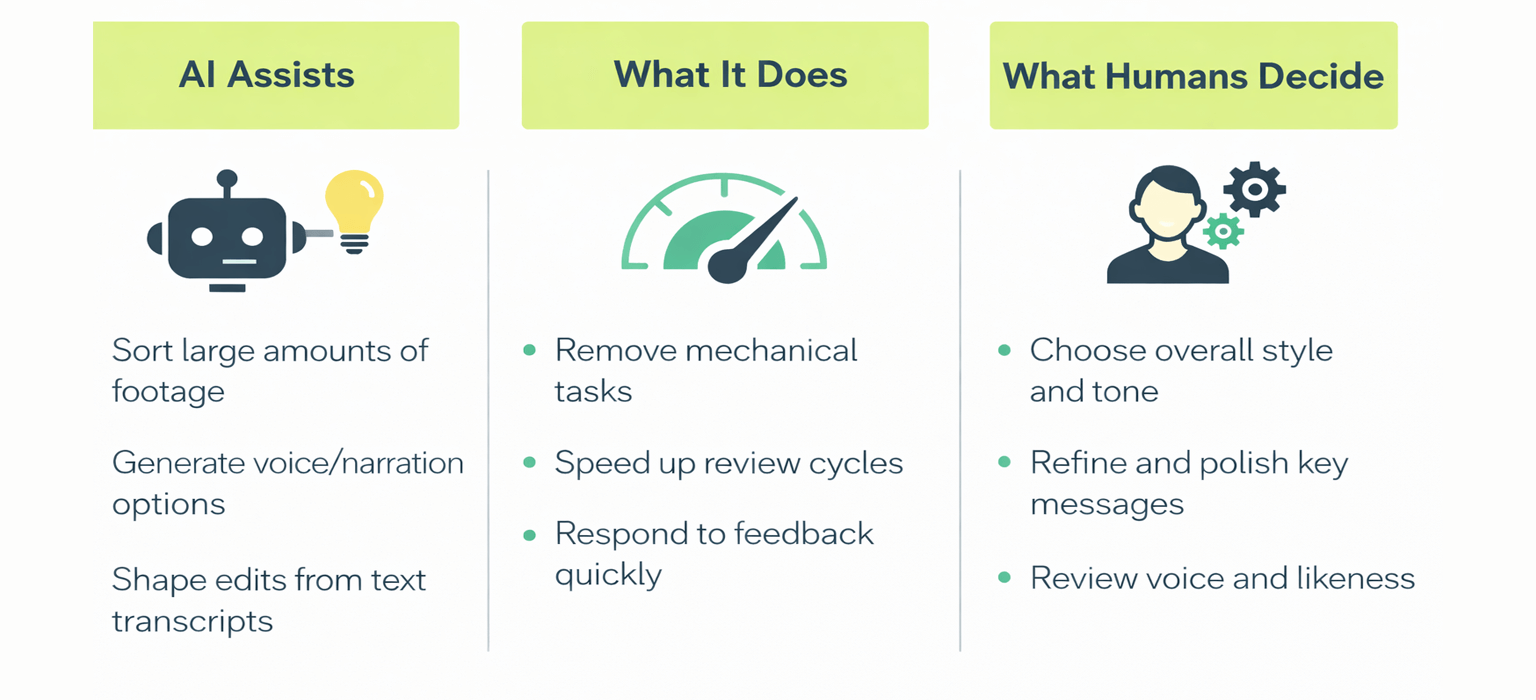
Where AI assists in video production, and where creative judgement remains human led.
When people say they are “using AI in video”, they are rarely talking about one platform. Most real workflows mix a few tools that support specific stages.
The value is often boring in the best way. Quicker transcripts. Cleaner handovers. Faster first assemblies. Less time lost to repetitive work. Used properly, automation removes friction. Creative decisions stay human.
An example of multi-camera automation speeding up switching while the editor keeps control of the story.
Here’s a quick snapshot of where AI tends to help most in day to day brand workflows.
Workflow summary
| Area of workflow | Benefit | Typical brand use |
|---|---|---|
| Editing support and automation | Reduces repetitive manual editing tasks | Multi camera interviews, panel discussions, event coverage, fast turnaround corporate edits |
| Voice and audio generation | Speeds up review cycles during development | Draft narration for internal reviews, pacing tests, accessibility and language variants |
| Text based editing | Makes collaboration easier during early cuts | Tightening interviews, restructuring sequences, enabling clearer feedback from non editors |
| Audience insights and performance feedback | Improves decision making for future content | Spotting drop off points, comparing platform performance, identifying moments that earn repeat viewing |
Tools that automate multi camera switching can remove a lot of mechanical work in interview and panel edits. They tend to be most useful when the editor sets structure first, then uses automation to speed up switching and clean-up, not to invent coverage that was never there.
Responsibility, trust and long term value
AI makes it easier to produce content that feels directly addressed to an audience. Training videos, internal updates, and multi version campaigns can be produced faster, which is a real win when timelines or budgets are tight.
The risk is that automation blurs the boundary between a draft and a statement. A synthetic voice meant for internal pacing tests slips into a version that gets shared. A cleaned transcript becomes “the quote” even when it is no longer the exact wording. A generated shot gets read as documentary evidence when it was only meant as illustration.
This is where a simple source record pays for itself. Not a big document, just a clear trail that answers three questions.
What did we capture for real
What did we generate or materially alter
Who signed off once it crossed from assistance into alteration
| Use case | Trust risk | Simple guardrail |
|---|---|---|
| AI voice for drafts | Draft audio becomes final by accident | Mark draft exports clearly and keep them out of public folders |
| Generative visuals | Audience assumes it was captured | Label synthetic shots in project notes and use clear captions when context depends on it |
| Transcript clean up | Edited words get treated as verbatim | Keep the raw transcript alongside the cleaned version |
A practical release habit that works under deadline is a five point check just before export. It catches the stuff that usually causes problems later.
Any synthetic or materially altered shot is marked in the project notes
Draft voice or temp audio is removed from the final timeline
Captions match what was actually said, not what a clean-up pass wished was said
Any generated visuals have captions that don’t imply they were captured
One named person signs off the final meaning, not just the technical finish
If you want a real world example of how origin trails are being supported at ecosystem level, the Content Authenticity Initiative explains how Content Credentials can travel with media and be read by viewers and platforms.
If you want the underlying standard rather than the overview, Content Credentials is a specification hosted by the Coalition for Content Provenance and Authenticity.
Regulation is moving in the same direction. The European Commission has said the rules covering transparency for AI generated content become applicable on 2 August 2026, alongside work on a code of practice for marking and labelling.
For most brands, the day-to-day answer is not fear. It is discipline. Ethical guardrails for AI video need to be practical enough to survive real deadlines, not just good intentions.
What this means in practice
AI is changing how video is made, but not why it matters. For brands, the opportunity lies in using technology to remove friction while keeping meaning, judgement and responsibility at the centre of the work.
As conversations continue around automation and authorship, it is worth reflecting on the future of human creativity in filmmaking, not as a technical problem to solve, but as a cultural question that shapes how stories are told and trusted.
Frequently asked questions about using AI in video production
This section supports brand decision makers who want clarity before adopting new tools, without turning the article into a technical manual.
Which AI tools are practical for UK based brand teams in 2026
Tools that slot into existing workflows tend to be the most useful. Editing automation, transcription, and controlled use of draft audio can speed up review without forcing teams to rebuild their process.
The best starting point is one bottleneck you already have, then a small test on footage you own.
How much time can AI realistically save during production
Time savings vary depending on the project and where the bottleneck sits. AI can be very effective on repeatable tasks like transcription, rough selects, basic versioning, and formatting for multiple platforms.
Overall timelines still depend on planning, approvals, and creative review. AI tends to save time in execution rather than in decision making.
Is AI suitable for corporate, brand and event video work
Yes. AI is particularly effective for editing support, speaker detection, draft voiceover generation and versioning content for different audiences or regions.
When used carefully, it improves consistency and speed while allowing teams to focus on message, tone and delivery.
What risks should brands consider when adopting AI tools
The main risks involve over reliance on automated output and loss of originality. There are also considerations around voice, likeness and data use that require human oversight.
AI works best when it supports creative judgement rather than replacing it. Review, restraint and transparency remain essential.
How should teams begin using AI in their video workflow
Starting with one tool and one use case is usually the most effective approach. Many teams begin by testing AI on existing footage, such as automating part of the edit or creating a draft voiceover for internal review.
This allows teams to understand both the benefits and the limits before expanding use more widely.